


I spent time with NKJV - New King James Version as a practical reading app rather than treating it like a simple digital copy of a book. It belongs to the Books & Reference category, and its purpose is clear: it gives readers access to the New King James Version of the Holy Bible in a format that is easier to carry, search, and return to during ordinary parts of the day. The app is free to download, is rated for Everyone, and comes from Mobile Bible apps.
My overall impression is that this is most useful for someone who wants the NKJV text close at hand without carrying a printed Bible everywhere. It feels especially suitable for short reading sessions, personal study, church preparation, and moments when I want to check a passage quickly. At the same time, the experience is not automatically perfect for every reader. The value depends on how comfortably you handle small-screen reading, how much navigation help you need, and whether you prefer a Bible app with a broader study system rather than a focused text-reading experience.
How the reading experience works for different readers
Readability and navigation on a small screen
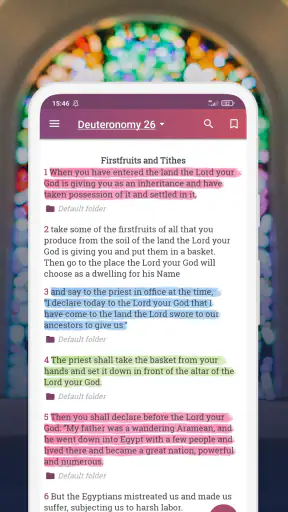
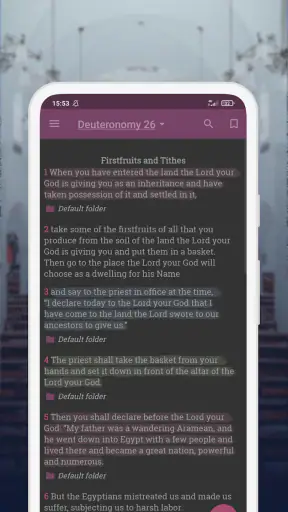
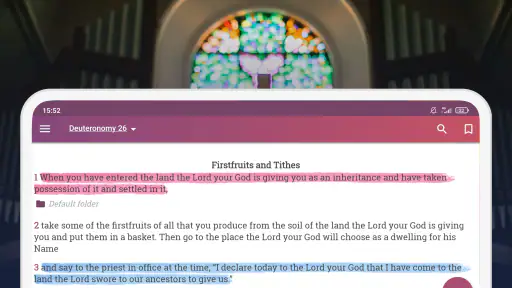
The strongest part of the app is its directness. When I open it with a particular passage in mind, I can concentrate on the text instead of working through a crowded collection of unrelated tools. That simplicity matters for readers who find heavily packed Bible apps tiring or distracting. The NKJV wording itself has a formal, traditional rhythm, so the cleanest possible reading flow is helpful: I can read a chapter, pause, and return later without feeling that the app is competing for my attention.
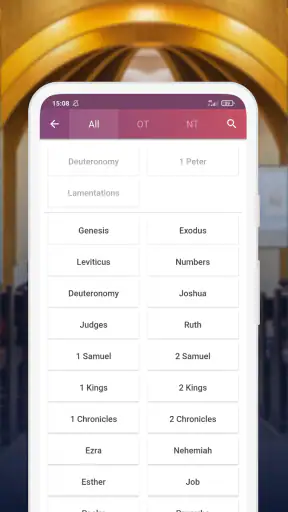
For someone who is already familiar with the books of the Bible, moving through the text feels natural. A new reader may need a little patience while learning where each book sits and how to move between passages. This is one of the first practical differences between a dedicated Bible reader and a general reading app: the content is organized by biblical books and chapters, not like a conventional novel with one continuous page. Once that structure becomes familiar, it can be faster than scrolling through a long digital document.
I found it helpful to approach navigation with a specific goal. Instead of opening the app and wandering, I would decide whether I wanted a quiet chapter reading, a verse lookup, or a passage for a conversation. That small habit reduces unnecessary tapping and makes the app feel more manageable. It is also a useful approach for readers who become overwhelmed by complex menus or who have difficulty remembering where they last stopped.
The NKJV text is a good fit for readers who appreciate traditional biblical language but want something more contemporary in presentation than a paper edition that may be harder to carry. However, readers who need extensive cross-references, scholarly notes, several translations side by side, or a large collection of study resources may find this app less complete than a full-featured Bible platform. I would choose it for focused reading first, not as a replacement for every kind of biblical research.
Text comfort, contrast, and personal setup
Reading comfort depends heavily on the phone or tablet being used and on the reader’s own settings. A larger display naturally gives more room for sustained reading, while a smaller phone can make longer chapters feel cramped. I would test the app during a normal reading session rather than judging it from a quick glance. The important question is whether your eyes remain comfortable after several paragraphs, especially if you plan to read in the evening or during a longer study period.
Readers with low vision may benefit from using the operating system’s own display adjustments, such as enlarged text or stronger contrast, where those settings work with the app. I would not assume that every visual adjustment behaves identically inside the reader, so checking the actual passage screen is worthwhile. If enlarged system text causes awkward spacing or makes navigation less convenient, a tablet may offer a better balance than forcing everything onto a small phone.
There is also a difference between making text larger and making reading easier. Very large text can reduce the amount of context visible at once, which means more page movement and a greater chance of losing your place. I found that a moderate size, a comfortable screen brightness, and short reading blocks can work better than maximizing every display setting. For someone with visual fatigue, reading one section at a time may be more sustainable than trying to finish a whole book in one sitting.
The traditional language of the New King James Version can affect readability as much as the screen does. Readers who already enjoy that style may find it expressive and familiar. Someone who struggles with older phrasing may need to reread sentences or consult another translation for comparison. That is not a defect in the app itself, but it is an important accessibility consideration: accessible presentation cannot completely remove the effort required by a more formal writing style.
Navigation and motor considerations
Touchscreen reading is convenient, but it asks the user to perform repeated gestures. Moving between books, chapters, and passages may require accurate taps, and readers with limited fine-motor control can find small controls more demanding than the reading itself. I recommend holding the device in a stable position and using a stand during longer sessions. That simple change reduces the need to grip the phone continuously and can make reading more comfortable for people with hand pain or tremors.
A short, deliberate workflow is easier than constant switching. I would open the desired book, select the chapter, read without repeatedly changing screens, and only then move to another passage. This reduces the number of precise touches and avoids unnecessary back-and-forth. It is a small but useful technique for anyone who finds repeated tapping tiring.
People who use a stylus may find it easier to select small interface elements, although the experience will depend on the device. Likewise, operating-system tools designed to assist touch control may help some users, but I would test them before relying on the app for group reading or public speaking. A feature that works well in a quiet room may feel too slow when someone is waiting for a passage to be found.
For readers who cannot comfortably use touch controls, the app may be less suitable than a Bible available through a more keyboard-friendly or dedicated assistive setup. I would not choose it solely because digital text sounds more flexible. The real test is whether the person can open a book, select a chapter, and return to the reading position without frustration. If those basic actions are difficult, a different format may be kinder and more practical.
Sound, light, and the situations in which it helps
The app is particularly convenient in situations where a printed Bible is awkward. I can imagine using it during a commute, while waiting for an appointment, or when packing for a trip and trying to keep belongings light. A phone is already something many people carry, so having the NKJV available in the same device can remove one extra item from the routine. This is also useful for readers who prefer not to draw attention to what they are reading in a public place.
Situational access is not only about portability. A phone screen can be easier to position than a large book for someone reading from a bed, wheelchair, or recliner. It can also be used close to the reader’s face without needing to hold open heavy pages. I would still recommend a stand or adjustable support for extended use, since holding a phone for a long time can create strain in the wrist, shoulder, or neck.
Lighting makes a noticeable difference. In bright outdoor conditions, reflections can make a screen harder to read; in a dark room, a bright display can be uncomfortable. Adjusting the device before beginning is more effective than repeatedly stopping in the middle of a passage. For readers sensitive to light, a dimmer environment and shorter sessions may make the experience more manageable, though the best setting will vary from person to person.
In a shared setting, the app can be useful when a group is asked to turn to a passage quickly. It is less ideal if the reader needs to display text to several people at once, because a phone screen is small and everyone may not be able to see it. A tablet or printed copy is better for group visibility. I see the app as a personal access tool first, not a substitute for a large communal display.
Someone who needs audio access should think carefully before choosing it as a primary Bible solution. A reading app can be excellent for visual text access while still being less convenient for a person who depends on spoken content. If listening is central to your routine, compare the app’s actual behavior with your device’s screen reader or other audio tools before committing to it. The important point is to test a complete passage, not merely whether the app opens.
Everyday workflows that make the app more useful
One realistic routine is a short morning reading session. I would choose a manageable passage, read it before checking messages, and leave the phone in one place rather than jumping between unrelated apps. The benefit is not a special productivity system; it is the reduced friction of having the text immediately available. For a reader who wants consistency, removing the need to find a physical book can make the first step easier.
Another useful workflow is preparation for a conversation or service. If I know the book and chapter beforehand, I can locate it before the event begins and keep the device ready. This is more reliable than trying to search while everyone else is already reading. It also helps readers with slower motor responses, because the navigation work happens in a calm moment rather than under time pressure.
A third approach is to use the app for comparison after reading a printed Bible. I might read a passage on paper for concentration, then use the phone later when I need a portable reference. This avoids treating digital reading and print as rivals. People with visual or physical limitations may also discover that alternating formats reduces strain: a larger print edition at home, followed by the app when traveling or moving around.
I would also suggest keeping sessions purpose-specific. Use one visit for continuous reading, another for locating a verse, and another for returning to a passage discussed with someone else. That structure is valuable because Bible apps can become confusing when a user tries to read, research, take notes, and compare translations all at once. NKJV - New King James Version works best when I let it do its central job clearly: provide access to the NKJV text.
What the app does well, and where the usual alternatives win
Compared with a printed Bible, the app wins on portability and immediate availability. I do not need a separate book in my bag, and the digital format is easier to use when I am away from home. Print still wins for people who dislike screens, want to avoid notifications, or find it easier to maintain concentration on a physical page. A printed edition may also be more comfortable for long sessions if it has large type and a well-designed layout.
Compared with a general ebook reader, this app has a more natural fit for readers who want the Bible arranged by its familiar books and chapters. A general reader may offer stronger typography controls or broader reading tools, but it may not feel as direct when moving through biblical references. On the other hand, someone who already has an accessible ebook workflow, keyboard support, or magnification setup may prefer staying with that familiar environment.
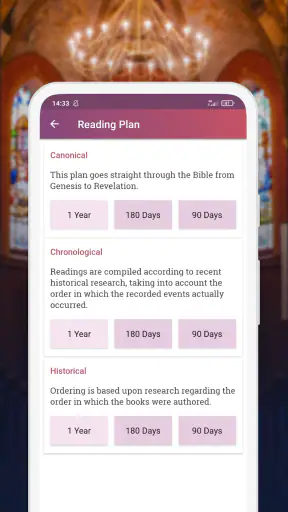
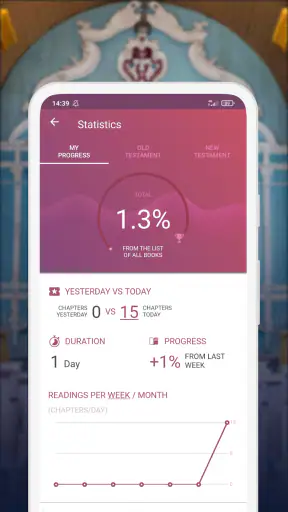
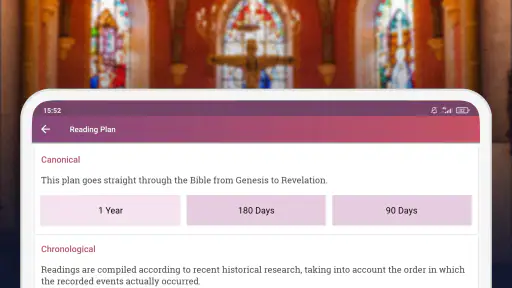
Compared with larger Bible study apps, this one is easier to approach when extra material becomes a distraction. The trade-off is depth. Readers looking for extensive commentary, original-language tools, reading plans, community features, or multiple translations may be better served elsewhere. I would not call that a failure; it is a choice about focus. The app is more convincing as a straightforward NKJV reader than as an all-in-one study library.
Mobile Bible apps has kept the product positioned as a free app, which lowers the barrier to trying it. There are in-app purchases priced at $5.99 per item, so anyone considering optional paid elements should check the purchase prompt carefully before confirming. I appreciate being able to begin without paying, but I also think users should decide in advance whether they only want the basic reading experience or are willing to spend on extras.
Remaining barriers before you make it your main Bible
The first barrier is dependence on a touchscreen device. A dead battery, a damaged phone, or an uncomfortable screen can interrupt access in a way that a printed Bible does not. I would not make a phone app my only option if uninterrupted reading is important to me. Keeping a physical copy or another dependable format nearby is sensible, especially for travel, emergencies, or long periods away from charging.
The second barrier is the learning curve for readers who are not comfortable with digital navigation. Even a focused app still requires selecting books and chapters, managing the device, and understanding how to return to a passage. A family member, caregiver, or friend can make the first setup less stressful by practicing the exact route to a frequently read book. After that, repetition usually matters more than technical knowledge.
The third barrier is that inclusive access varies by person. A reader with mild visual difficulty may find a phone perfectly workable, while someone with severe low vision may need a larger screen or a dedicated audio solution. A person with steady hand control may navigate easily, while someone with tremors may need a stand, stylus, or alternative format. I would judge the app by the complete reading task, not by the fact that it is digital.
There is also the question of attention. A phone brings calls, alerts, and other temptations into the same space as the Bible text. If concentration is difficult, switching to a printed edition may be the better choice even when the app is more convenient. I found that placing the device on silent and reading in a defined time block makes the digital format feel more like a book and less like another phone activity.
My inclusive verdict
NKJV - New King James Version is a sensible choice for readers who specifically want the NKJV text in a portable, free Bible app. Its strongest qualities are focus, convenience, and an approachable role in everyday reading. The app has reached over a million installs, and its average rating is 4.8 from around twenty-one thousand ratings, which suggests that many users find the basic experience dependable and worthwhile.
It is also a mature option rather than a brand-new experiment: the app was released on April 12, 2021, and the current version is 1.64. The minimum operating system is Android 7.0, so compatibility should be considered before installation. These details matter for readers using older devices, particularly anyone relying on an older phone because newer hardware is difficult to afford or physically uncomfortable to use.
I would recommend it to a reader who wants a personal NKJV reference, prefers a focused interface, and can comfortably manage touch navigation. I would be more cautious about recommending it as the only solution for someone who needs guaranteed audio access, extensive study aids, very large text, or hands-free operation. In those cases, a different Bible app, a print edition, or a combination of formats may provide better support.
My final advice is to test it in the situation where you will actually use it. Read a full passage in your usual lighting, try locating a book without rushing, and check whether the text remains comfortable after several minutes. If that routine feels smooth, the app can become a genuinely useful companion. For focused NKJV reading with fewer distractions, it is a practical choice; for specialized accessibility or deep study, I would pair it with a format designed for those needs.


